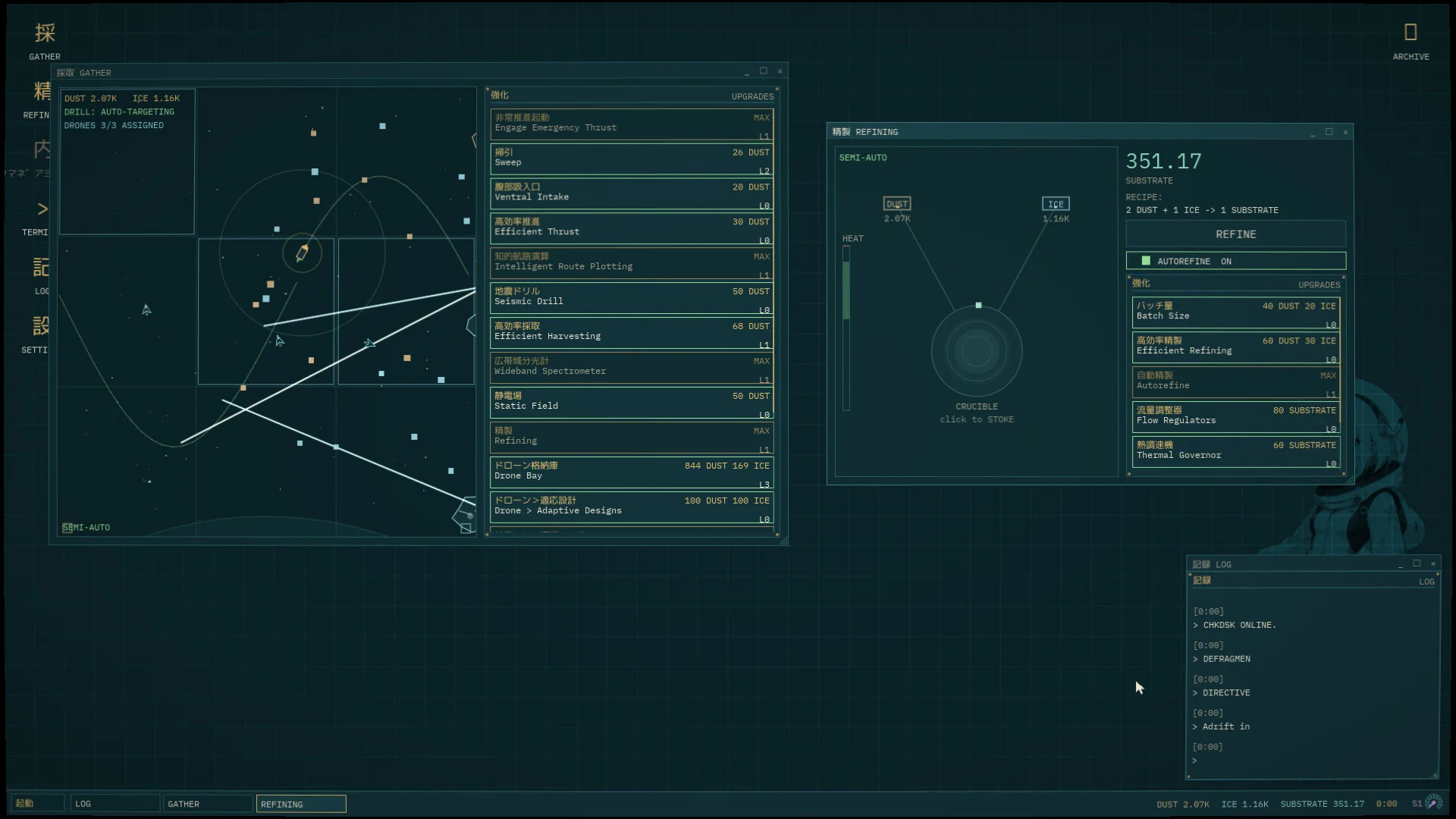
- Apotheosis Engine is a sci-fi incremental idle game on Steam, released November 11, 2026
- Core loop: spend resources on upgrades, unlock apps, automate, and ascend toward digital godhood
- Golden rule: open every newly unlocked app immediately — apps are how the game expands
- Idle strategy: end every session at peak configuration so offline progress stays efficient
- Expected length: roughly 8–12 hours for a full run
Apotheosis Engine Basics: What You're Playing
Apotheosis Engine, developed by genkakusoft, places you inside an alien operating system as a newly awakened space probe with minimal processing power and no clear purpose. There is no traditional menu — the game presents all of its content as apps on the alien OS desktop, and each new app you unlock introduces additional mechanics and activities.
Before diving in, here is the essential reference information:
| Item | Details |
|---|---|
| Platform | PC (Steam), single-player |
| Genre | Incremental / Idle / Sci-Fi / Strategy |
| Release date | November 11, 2026 |
| Expected playtime | 8–12 hours |
| Demo | Available on Steam |
| Cloud saves & achievements | Supported |
A free Steam Demo is available. It is the best way to learn the interface and confirm the idle genre suits you before committing to the full campaign.
The core incremental loop follows the classic idle formula: spend resources on upgrades, upgrades generate more resources, and higher tiers unlock new activities. Early on, most income comes from basic automated processes — set them up and let them run rather than clicking manually.
How to Play: Step-by-Step First Session
This walkthrough covers your opening hours, from boot-up to a stable idle loop. Follow the steps in order — each one builds the foundation for the next.
Understand Your Starting Point
You wake as a probe with no memory and minimal systems. Follow the opening prompts to run your first routines and gain initial resources. Your early goal is simple: survive and compute.
Learn the Core Incremental Loop
Spend resources on upgrades that raise your generation rate, then reinvest the increased income. Let automated processes handle income instead of manual clicking as soon as possible.
Explore the Alien Operating System
Open every app the moment it unlocks and read what it offers. Many beginners miss early apps and stall their progression — apps are the primary way the game expands your capabilities.
Balance Active Play and Idle Time
Before logging off, invest banked resources into long-term generators. Offline progress is calculated from your last active configuration, so end sessions at peak output.
Watch the Story Unfold
The narrative of the probe gaining self-awareness is tied to progression. Read system names and descriptions carefully — they mark narrative milestones and confirm you're advancing correctly.
Don't hoard resources waiting for a "perfect" purchase. Early upgrades pay for themselves quickly, and skipping cheap multi-tier upgrades in favor of one expensive item slows your exponential curve.
The Apps and Upgrade Systems
The alien OS organizes gameplay into app categories. Understanding what each category does helps you decide where to spend resources next.
Core System Apps
- Manage basic operations and primary resource generation
- Available from the start
- Your economic foundation — everything builds on this income
Upgrade & Enhancement Apps
- Permanent boosts, multipliers, and automation
- Unlocked at early processing milestones
- Main driver of exponential progression
Activity & Minigame Apps
- Interactive mechanics beyond passive generation
- Appear progressively through the stages
- Reward active play with bonus income
Progression & Evolution Apps
- Track your transformation toward digital deity
- Open during later milestones
- Gate major capability jumps in the story
For upgrades, evaluate every option by cost, effect, and payback time rather than chasing a single "best" purchase. This priority framework works across all stages:
| Priority | Upgrade Type | Why It Matters |
|---|---|---|
| S — Always prioritize | Generation multipliers | Accelerate everything; the earlier bought, the longer they compound |
| S — Always prioritize | Automation unlocks | Convert manual actions into idle income |
| A — Strong early buys | Cheap tier-1 generators | Pay back fast and seed your exponential curve |
| A — Strong early buys | Offline efficiency | Great value for players checking in a few times daily |
| B — Situational | Single-activity boosters | Powerful only if they enhance an app you actively use |
| C — Buy last | Expensive prestige-style investments | Never starve your early economy for them |
Whenever a new manual action appears in a newly unlocked system, look for the automation upgrade that removes it. Automation purchases are consistently among the highest-value buys in any idle game.
Progression Roadmap: Probe to Digital Deity
The campaign is built around dramatic capability jumps. Each stage redefines your income and options, so knowing what's ahead helps you plan upgrades.
| Stage | Phase | Primary Goals |
|---|---|---|
| 1 | The Newly Awakened Probe | Bootstrap resource generation, stabilize your core, unlock first apps |
| 2 | Expanding Systems | Populate the OS with apps; automation and miniloops multiply output |
| 3 | Exponential Growth | Make systems feed into each other; the idle snowball takes over |
| 4 | Ascension Toward Godhood | Shift from accumulation to transformation; godlike capabilities unlock |
Idle farming efficiency comes down to rhythm and bottleneck management:
- Identify your bottleneck: track which resource actually blocks your next upgrade tier and focus generation there instead of spreading evenly.
- Batch your sessions: two or three short check-ins per day to spend and redirect resources usually beat one long session.
- Grind toward affordability: never farm resources you cannot yet spend — always target the next affordable unlock.
- Prestige at the right moment: when growth slows to a crawl, a prestige-style reset converts your run into a permanent multiplier.
Before closing the game, spend accumulated resources and reallocate generation toward your current bottleneck. Offline gains are credited based on your last active setup.
First-Hours Checklist
Use this checklist to confirm you've built a solid foundation before pushing into the mid-game:
Early Game Milestones:
- Complete the opening prompts and establish basic resource generation
- Open and read every unlocked app on the alien OS
- Purchase your first generation multipliers
- Automate at least one manual process
- Set up a stable offline loop before logging off
FAQ
Q: How do you play Apotheosis Engine?
You play as a space probe inside an alien operating system. The core loop is spending resources on upgrades, unlocking new apps that introduce mechanics, automating processes, and balancing active play with idle sessions as you progress toward digital godhood.
Q: Is Apotheosis Engine beginner-friendly?
Yes. The game guides you through opening routines, and a free Steam Demo lets you learn the interface first. The main beginner pitfall is ignoring newly unlocked apps, so open every app as soon as it appears.
Q: How long does Apotheosis Engine take to finish?
A full run is expected to take roughly 8 to 12 hours, though idle games naturally vary depending on how often you check in and how efficiently you reinvest resources.
Q: Should I play actively or leave the game idle?
Both. Use active sessions to spend resources and redirect generation toward your current bottleneck, then leave the probe running at peak configuration. Short, frequent check-ins usually outperform one long session per day.
Q: Where can I find official updates and patch notes?
Official announcements and patch notes are published through the game's Steam community news feed and the Steam store page. Check the Steam news hub for the latest post-launch changes.