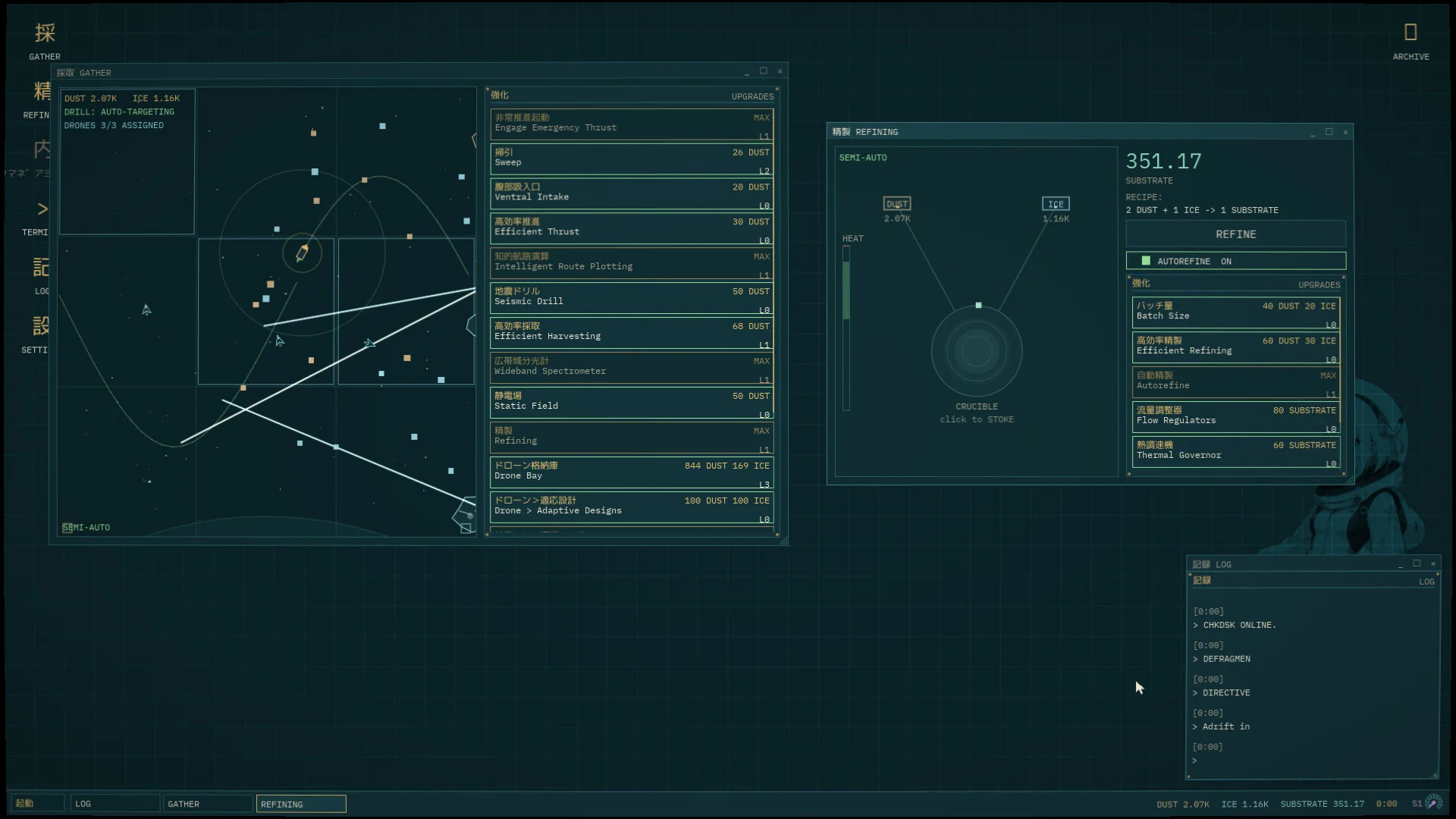
- Apotheosis Engine apps unlock order follows your progression from probe to digital deity
- Core System Apps come first and form your economic foundation
- Upgrade Apps unlock at early processing milestones and drive exponential growth
- Never ignore a newly unlocked app — each one introduces new mechanics
- End every session at peak configuration so offline progress keeps compounding
Understanding the Apotheosis Engine Apps Unlock Order
Instead of a traditional menu, Apotheosis Engine presents all of its content as apps running on a mysterious alien operating system. As your newly awakened space probe advances through the game's stages, newly unlocked applications introduce additional activities and mechanics. Understanding the general apps unlock order is one of the most important skills for new players, because skipping or delaying an app can stall your progression for hours.
The game follows a classic incremental loop: spend resources on upgrades, upgrades generate more resources, and higher tiers unlock new apps and activities. Apps are the primary way Apotheosis Engine expands your capabilities — they are not optional extras.
| App Category | Function | When It Unlocks | Progression Benefit |
|---|---|---|---|
| Core System Apps | Basic probe operations, primary resource generation | Available from the start | Economic foundation for everything else |
| Upgrade & Enhancement Apps | Permanent boosts, multipliers, automation | Early processing milestones | Main driver of exponential scaling |
| Activity & Minigame Apps | Interactive activities beyond passive generation | Progressive, stage by stage | Bonus income for active play |
| Progression & Evolution Apps | Track transformation toward digital deity | Later progression milestones | Gates major capability jumps |
Open each app the moment it unlocks and read what it offers. Many beginners miss early apps and stall their progression — the unlock notification itself is your signal to investigate.
Recommended Unlock Order: Step by Step
The exact unlock conditions for individual apps reveal themselves in-game, and the app categories follow a consistent sequence tied to your probe's development stages. Follow this order of operations to build a strong economy before chasing late-game systems.
Establish Core Generation First
Your first priority is the Core System Apps available from the start. Set up stable automated resource generation and let it run rather than clicking manually. Every other app builds on the income these provide.
Reach Early Processing Milestones
Push your probe's basic processing forward until the Upgrade & Enhancement Apps appear. These are your early progression milestones and signal the transition from bootstrap phase to scaling phase.
Buy Generation Multipliers and Automation
Inside the upgrade apps, prioritize resource generation multipliers and automation unlocks. Automation converts manual actions into idle income — the backbone of any idle game run.
Layer In Activity Apps As They Appear
As Activity & Minigame Apps unlock progressively, sample each one before committing heavy resources. Match single-activity boosters to apps you actually use.
Advance Toward Evolution Apps
Later milestones open the Progression & Evolution Apps, which gate your transformation from probe toward digital deity. By this point your layered economy should support the expensive late-stage investments.
New systems rarely demand immediate investment. Watch how a newly unlocked app interacts with your core loop for a session or two before committing large amounts of resources into it.
App Priority Comparison at Each Stage
Different apps deliver different value depending on where you are in the progression arc. Use this comparison to decide where your next batch of resources should go.
| Progression Stage | Best App Focus | Why It Matters | Priority |
|---|---|---|---|
| Stage 1: Newly Awakened Probe | Core System Apps | Stabilize generation, bootstrap resources | ★★★★★ |
| Stage 2: Expanding Systems | Upgrade & Automation Apps | Turn linear income into scaling power | ★★★★★ |
| Stage 3: Exponential Growth | Activity Apps + system interactions | Feed systems into each other for snowballing | ★★★★ |
| Stage 4: Ascension | Evolution Apps | Transformation toward digital deity | ★★★★ |
Economy-First Approach
- Maximize Core and Upgrade Apps
- Safest for new players
- Slower early, strong long-term scaling
Active-Play Approach
- Lean into Activity Apps
- Higher ceiling for hands-on sessions
- Requires frequent check-ins
Balanced Approach
- Automate early, sample activities
- Works for most playstyles
- Recommended default for first run
Progression stalls when one resource lags far behind the others. Identify which currency or unlock is actually blocking your next tier of upgrades, and focus the relevant app's generation on that resource instead of spreading upgrades evenly.
Common Unlock Mistakes to Avoid
| Mistake | Consequence | Fix |
|---|---|---|
| Hoarding resources for a "perfect" purchase | Slower growth; early upgrades pay for themselves quickly | Buy affordable generation upgrades early |
| Ignoring newly unlocked apps | Missed mechanics, stalled progression | Open and read every app on unlock |
| Spreading upgrades too thin | Every system underpowered | Concentrate spending on your bottleneck system |
| Grinding resources you cannot spend | Wasted time on unusable currency | Check unlock requirements before farming |
| Rushing late-stage systems | Starved early economy | Let your baseline income stabilize first |
Offline gains are calculated from your last active configuration. Always spend banked resources and set your best resource generation running before closing the game, or your idle hours will underperform.
Unlock Order Checklist
Work through this checklist during your first run to confirm you are following a healthy apps unlock order from probe to digital deity.
App Unlock Milestones:
- Set up stable Core System App generation before anything else
- Unlock and open the first Upgrade & Enhancement App
- Purchase at least one automation upgrade
- Try every newly unlocked Activity App at least once
- Reach the first Progression & Evolution App milestone
Two or three short sessions a day to spend resources and redirect generation usually beat one long session. Consistent check-ins keep growth compounding without turning the game into a chore.
FAQ
Q: What is the best apps unlock order in Apotheosis Engine?
Start with the Core System Apps available from the beginning to establish resource generation, then move to the Upgrade & Enhancement Apps that unlock at early processing milestones. Activity & Minigame Apps appear progressively as you advance, and Progression & Evolution Apps open during later milestones on your path toward digital deity.
Q: Can I skip an app and unlock it later?
Apps unlock automatically as you progress, but skipping the content inside an app is risky. Many beginners miss early apps and stall their progression, because each app introduces mechanics that later systems build on. Open every app the moment it unlocks.
Q: How do I know which app to invest resources in?
Identify your current bottleneck — the resource or unlock actually preventing your next tier of upgrades — and focus the relevant app on it. Prioritize resource generation multipliers and automation unlocks over one-time bonuses, and never grind a resource you cannot yet spend.
Q: Do newly unlocked apps need immediate investment?
Usually not. Watch how a new app interacts with your core loop for a session or two before committing large amounts of resources. Concentrate spending on the system feeding your current bottleneck rather than spreading upgrades evenly.