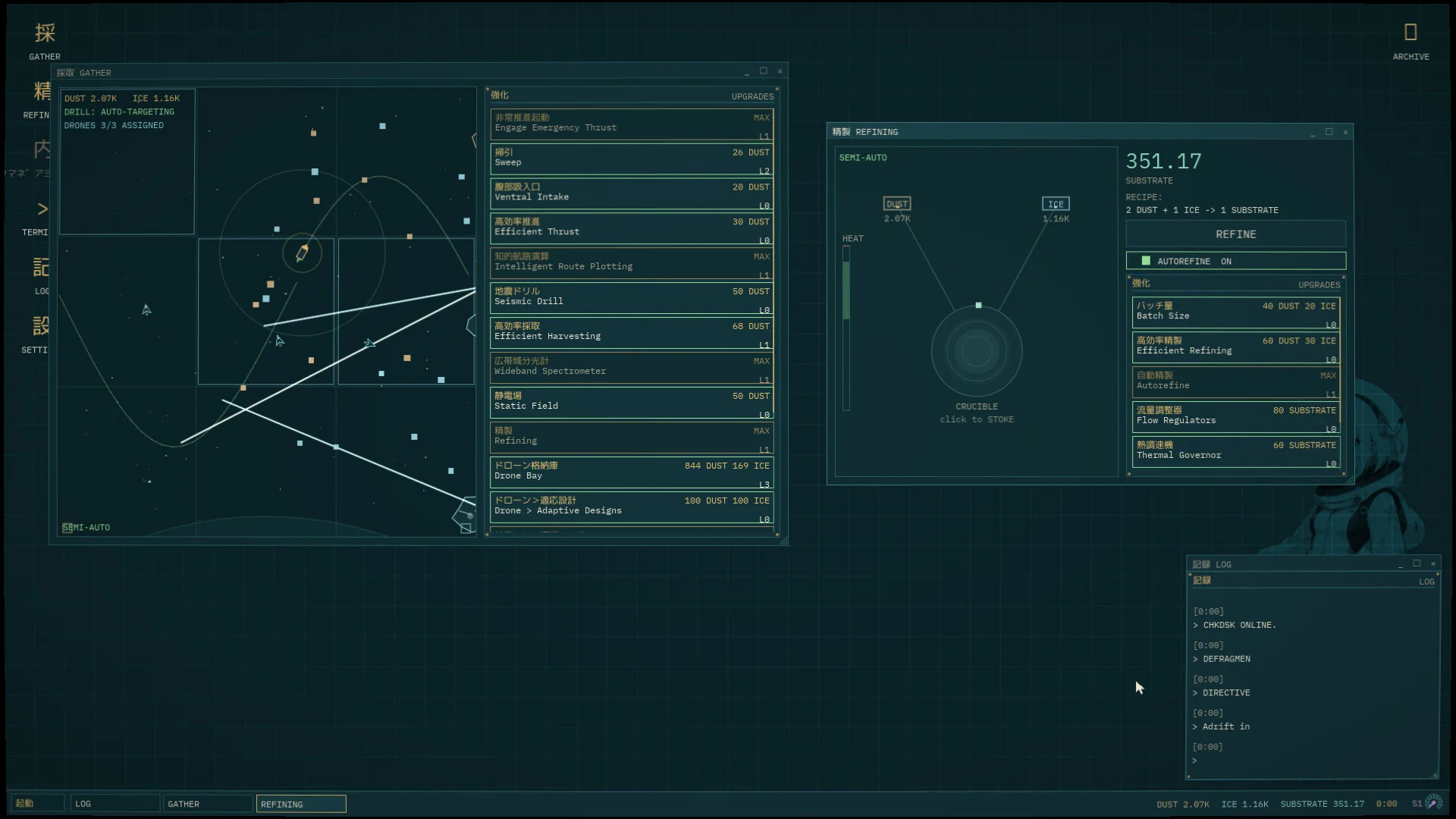
- Apotheosis Engine demo: A free Steam trial (AppID 4714760) that lets you sample the alien OS before buying.
- Full game released: November 11, 2026 on Steam (AppID 4665590) by developer genkakusoft.
- Demo focus: Early probe awakening, core resource loop, and first app unlocks.
- Best use: Treat the demo as a tutorial — test the idle loop, then decide on the full 8–12 hour campaign.
- Save support: Both demo and full game support Steam Cloud saves.
What the Apotheosis Engine Demo Is
The Apotheosis Engine demo is the free trial version of Apotheosis Engine, a sci-fi incremental idle game developed by genkakusoft. The full game launched on Steam on November 11, 2026, and the demo remains available as a separate download with its own Steam AppID (4714760), distinct from the main release (4665590).
The demo gives you a taste of the game's core premise: you wake as a lost space probe with no memory, boot into a mysterious alien operating system, and begin the long climb from simple machine toward digital deity. It is best understood as an extended tutorial covering the earliest stages of the campaign.
| Item | Demo | Full Game |
|---|---|---|
| Price | Free | Paid Steam title |
| Steam AppID | 4714760 | 4665590 |
| Content scope | Early stages and first apps | Full 8–12 hour campaign |
| Steam Cloud saves | Supported | Supported |
| Achievements | Limited / none | Full achievement set |
| Leaderboards | TBA | Supported |
Idle games live or die by their core loop. The demo lets you verify that Apotheosis Engine's alien OS interface and probe-awakening loop click for you before committing to the full release.
How to Download and Start the Demo
Getting into the demo takes only a few minutes. Follow this order of operations to avoid the most common setup mistakes.
Open the Steam Store Page
Search for "Apotheosis Engine" on Steam or visit the official store page directly. The demo download panel appears on the main game's page.
Download the Demo App
Install the demo from its own store listing (AppID 4714760). It installs separately from the full game in your library.
Boot the Alien OS
Launch the demo and follow the opening prompts. Your probe runs its first routines and generates your starting resources.
Learn the Core Loop
Spend resources on upgrades, let automated processes generate income, and unlock the first apps on the operating system.
Evaluate Before Buying
If the loop holds your attention through the demo's early stages, the full campaign expands into later progression, secrets, and endings.
Do not expect the demo to include late-game systems, prestige mechanics, endings, or the full app roster. Those belong to the complete release.
Demo vs. Full Game: What Changes
The jump from demo to full release is significant. The demo covers the awakening and first system expansions; the full game carries you through exponential growth and the ascension toward digital godhood.
In the Demo
- Probe awakening stage
- Basic resource generation
- First app unlocks
- Core OS navigation
Full Game Early
- Multiple app categories
- Upgrade priority decisions
- Active vs. idle balance
- Offline progression tuning
Full Game Late
- Exponential scaling systems
- Hidden secrets and discoveries
- Story milestones and endings
- Steam achievements and leaderboards
| Feature | Demo Experience | Full Game Experience |
|---|---|---|
| Playtime | Roughly 1–2 hours | 8–12 hours |
| Apps | Early core apps only | Full app roster across all stages |
| Secrets | Not included | Hidden features and clues |
| Endings | Not included | Multiple narrative outcomes |
| Replay value | Single taste | Upgrade routes and achievement runs |
Confirm on the store page whether the demo transfers save data to the full game. Steam Cloud saves are supported on both, but cross-product carryover is not guaranteed for every title.
Beginner Priorities Inside the Demo
Use your demo time wisely. These priorities, drawn from the game's confirmed systems, give you the clearest picture of whether the full release suits you.
- Open every app immediately when it unlocks — many players stall by ignoring new apps.
- Buy early upgrades quickly instead of hoarding resources for a "perfect" purchase.
- Set up automated processes before you step away; offline gains depend on your last configuration.
- Read system names and descriptions — the story is told through the OS itself.
- End sessions at peak configuration so idle time is never wasted.
| Beginner Mistake | Why It Hurts | Fix |
|---|---|---|
| Hoarding resources | Early upgrades compound fast | Buy the cheapest meaningful boost |
| Skipping new apps | Apps gate new mechanics | Open and read each unlock |
| Manual clicking late | Wastes time vs. automation | Prioritize automation unlocks |
| Spreading upgrades thin | Every system stays weak | Focus on the current bottleneck |
Demo Completion Checklist:
- Awaken the probe and run first routines
- Establish stable automatic resource generation
- Unlock and inspect every available app
- Purchase at least one generation multiplier upgrade
- Complete one offline session and check credited gains
If you finish the checklist and want more, the full game's progression from probe to digital deity, plus its secrets and achievements, is where the real depth lives.
FAQ
Q: Is the Apotheosis Engine demo free?
Yes. The demo is a free download on Steam with its own AppID (4714760), separate from the paid full game (4665590) that launched November 11, 2026.
Q: Does demo progress carry over to the full game?
Both versions support Steam Cloud saves. For the latest word on save transfers between the Demo and the full game, the Steam store page and the developer's Discord are the fastest sources.
Q: How long is the demo compared to the full game?
The demo covers the early awakening stages, roughly 1–2 hours. The full campaign runs an estimated 8–12 hours including secrets, endings, and achievements.
Q: Where do I report bugs or give feedback on the demo?
The official Steam discussion forums and the developer genkakusoft's Discord are the primary channels for demo feedback and post-launch patch announcements.
Post-launch balance changes and new content are announced through the game's Steam news hub. Check the official store page and community news feed for the latest patch notes.