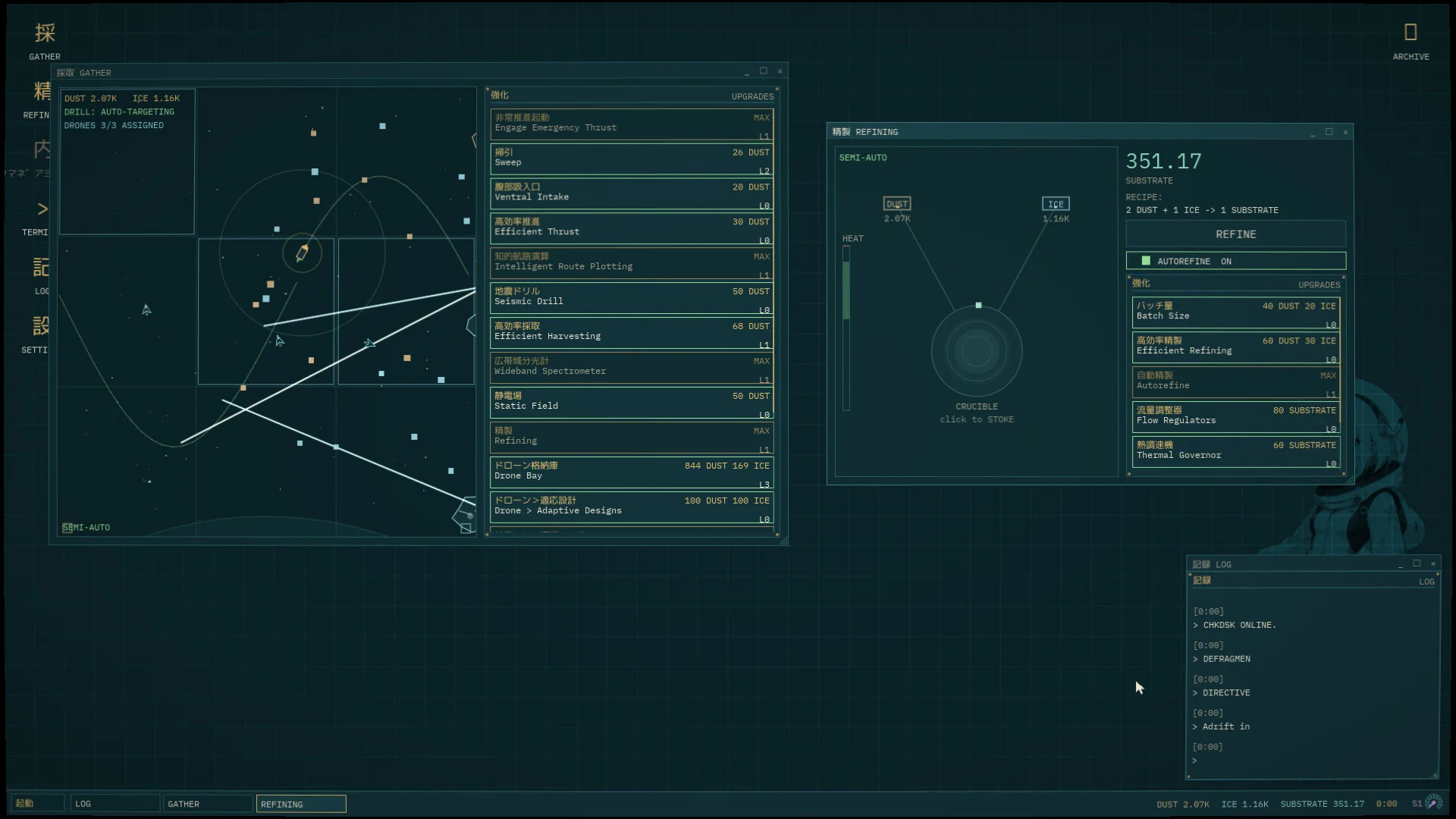
- Apotheosis Engine demo download is available free on Steam (Demo AppID 4714760).
- The full game launched November 11, 2026 (AppID 4665590) with 97% positive reviews.
- Demo players awaken as a space probe inside an alien operating system.
- Early priority: set up automated resource generation, then open every unlocked app.
- Expected playtime for the full game: 8–12 hours.
Apotheosis Engine Demo Download Basics
The Apotheosis Engine demo download gives you a free preview of genkakusoft's sci-fi incremental game before committing to the full release. The demo runs through the same Steam client as the main game, so setup takes only a few minutes on any modern PC.
Before installing, confirm your machine meets the basics: a Steam account, the Steam client installed, and enough free disk space for a lightweight indie idle game. The demo and the full game are listed as separate entries on Steam, so make sure you land on the correct page.
| Item | Detail |
|---|---|
| Demo Name | Apotheosis Engine Demo |
| Demo AppID | 4714760 |
| Full Game AppID | 4665590 |
| Developer / Publisher | genkakusoft |
| Full Release Date | November 11, 2026 |
| Platform | PC (Steam) |
| Genre | Incremental / Idle / Sci-Fi / Strategy |
| Full Game Playtime | 8–12 hours |
Steam demo availability and content scope can change after launch. Always verify the current demo status on the official Steam store page for AppID 4714760 before downloading.
Step-by-Step Demo Installation
Follow this sequence to get the demo running and start your first session efficiently. The process mirrors installing any Steam demo, but each step below includes probe-specific advice for a smooth first run.
Open the Demo Store Page
In the Steam client, search for "Apotheosis Engine Demo" or go directly to the demo's store page (AppID 4714760). Confirm the developer is listed as genkakusoft to avoid lookalike pages.
Download and Install
Click the download button on the demo page. The install size is small compared to most Steam releases, so even slow connections finish quickly.
Launch and Complete the Awakening
On first launch, follow the opening prompts. You begin as a newly awakened space probe with minimal processing power — run your first routines to gain initial resources.
Set Up Automated Generation
Establish your basic resource loop early. Income in the opening stage comes mostly from automated processes, so configure them before doing anything else.
Explore the Alien OS
Open every app the moment it unlocks on the alien operating system. Each app introduces new mechanics, and missing early apps is one of the most common progression stalls.
The demo covers only the opening portion of the experience. The full game, released November 11, 2026, includes the complete progression arc toward digital godhood, Steam achievements, cloud saves, and leaderboards — features the demo may not fully expose.
Demo vs. Full Game Comparison
Deciding whether the demo is enough or the full game is worth buying comes down to what each version offers. The table below compares confirmed features across both editions.
| Feature | Demo | Full Game |
|---|---|---|
| Opening awakening stages | Yes | Yes |
| Full app roster on alien OS | Partial | Yes |
| Progression to digital deity | No | Yes |
| Steam achievements | No | Yes |
| Cloud saves | Limited | Yes |
| Leaderboards | No | Yes |
| Price | Free | Paid |
Try the Demo If
- You are new to incremental idle games
- You want to test the alien OS interface
- You prefer short sampler sessions
Buy the Full Game If
- You want the full probe-to-deity arc
- You chase Steam achievements
- You enjoy 8–12 hour completion runs
Community Signal
- 97% positive review rating at launch
- 200+ Steam reviews counted near release
- Active developer Discord and forums
Treat the demo as a tutorial. Skills you build — upgrade prioritization, bottleneck tracking, offline-loop setup — transfer directly to a stronger full-game start.
First-Hour Strategy After Downloading
Once the demo installs, your first hour determines how quickly exponential growth kicks in. These priorities reflect the game's confirmed core loop: spend resources on upgrades, upgrades generate more resources, and higher tiers unlock new activities.
| Priority | Action | Why It Matters |
|---|---|---|
| 1 | Establish basic generation | Every other system builds on baseline income |
| 2 | Buy generation multipliers early | Compounding starts sooner |
| 3 | Unlock automation | Converts active time into idle time |
| 4 | Open each new app immediately | Apps gate new mechanics and income sources |
| 5 | End sessions at peak config | Offline gains reflect your last active setup |
Avoid saving resources for a "perfect" purchase. Early upgrades pay for themselves quickly, and cheap multi-tier buys usually beat hoarding for one expensive item.
Demo First-Hour Goals:
- Complete the awakening prompts and first routines
- Establish one stable automated resource process
- Purchase your first generation multiplier
- Open and read every unlocked app
- Reinvest all banked resources before closing the game
Trusted Sources and Avoiding Fake Downloads
The Demo lives on the official Apotheosis Engine Steam page — downloading there keeps your system safe and your version current.
| Source | What You Get |
|---|---|
| Steam store page (4665590) | Official game info, trailer, reviews |
| Steam demo page (4714760) | The only legitimate demo download |
| Steam community forums | Announcements and patch notes |
| Developer Discord | Direct developer updates |
| Developer YouTube / X | Trailers and official media |
Do not download "demo" builds from non-Steam mirror sites. Unofficial installers carry malware risk and will not connect to Steam achievements, cloud saves, or leaderboards.
FAQ
Q: Is the Apotheosis Engine demo free?
Yes. The demo is listed separately on Steam under AppID 4714760 and can be downloaded at no cost with a standard Steam account. The full game released November 11, 2026 is a separate paid product.
Q: Does demo progress carry over to the full game?
There is no confirmed save-transfer system between the demo and the full release. Treat the demo as a tutorial — the strategy habits you build transfer, even if the save file does not.
Q: How long is the demo compared to the full game?
The full game runs roughly 8 to 12 hours. The demo covers only the opening awakening stages where you set up your first resource loop and explore the initial apps on the alien operating system.
Q: Does the Apotheosis Engine demo support Steam achievements?
Steam achievements, cloud saves, and leaderboards are confirmed features of the full game. Demo coverage of these features is limited, so achievement hunters should plan around the full release.